Fast, Simple & Powerful Bulk File Renaming.
Portable Open source
23 downloads
17.1 MB

Bulk QR codes from Excel and CSV, without uploading your data anywhere
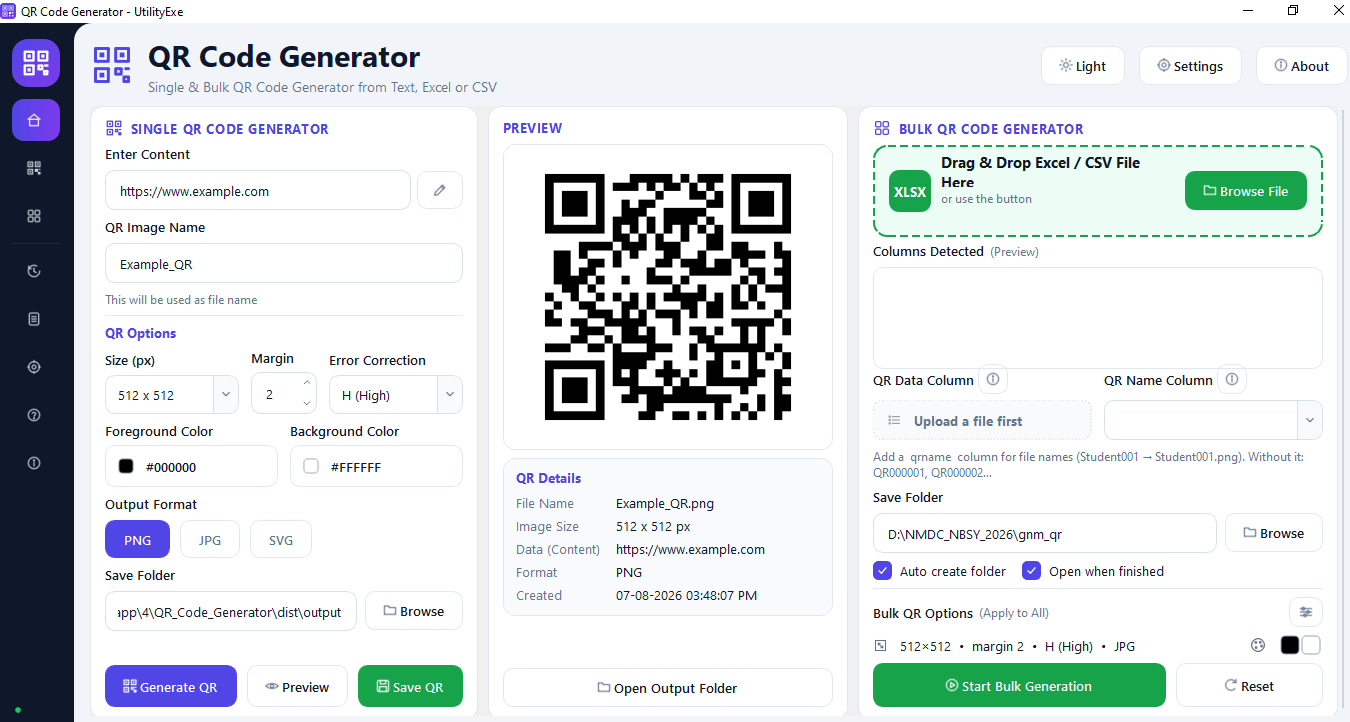
Create individual codes from text, URL, phone, email, SMS, WhatsApp, WiFi or UPI data with a live preview that updates as you type.
Fill in normal fields and the app writes the exact payload syntax a scanner expects for WiFi, UPI, mailto, smsto and wa.me links.
Read .xlsx, .xlsm, .csv and .tsv files and produce one QR code per row, from a handful to many thousands.
Drop a spreadsheet straight onto the window or browse for it; columns are detected automatically and the first rows shown as a preview.
Tick any combination of your own columns, reorder them, and combine them into a single code instead of being limited to one field.
Join combined columns with a pipe, dash, comma, space, new line, slash, colon, underscore or your own custom text.
Encode values only, or include labels so the scanned result reads Name: Apu Patra | Dob: 05-01-1920 instead of bare values.
Override any column heading for the encoded output, so a column called dob can appear as Date of Birth.
See the exact encoded string built from your first row, updating as you change columns, separators or labels, before generating anything.
Pick a column for output file names, or add a qrname column so Student001 becomes Student001.png.
With no name column present, files are numbered sequentially as QR000001, QR000002, QR000003 and onward.
Illegal characters are replaced with underscores and duplicate names are suffixed rather than overwritten.
Blank rows are ignored and rows with empty QR data are skipped and written to the log instead of silently failing.
Generation runs on a thread pool off the interface thread, so the window stays responsive through long runs.
Progress bar, elapsed time, remaining time, estimated completion, completed and failed counters, current file and a Cancel button.
An end-of-run summary with an Open Output Folder button so you go straight to the results.
Export as raster or as true vector SVG that stays sharp at any print size, from business card to banner.
Any size from 64 to 4096 pixels, with 256, 512 and 1024 as one-click presets, plus an adjustable quiet-zone margin.
Choose L, M, Q or H to balance data capacity against how much damage or obstruction a code can survive.
Separate foreground and background colour pickers for both single and bulk output.
Five built-in presets plus your own saved settings, applied to either the single or the bulk generator.
Every run recorded with date, source file, count, output folder and status, viewable inside the app.
Per-day logs listing errors, skipped rows and completed rows for anything you need to trace afterwards.
Both themes included and remembered between sessions, switchable with Ctrl+T.
Last output folder and last QR options restored on next launch from a local config file.
Fits a 1366x768 screen without scrolling; the sidebar collapses to an icon rail on narrow windows and expands on wide ones.
Ctrl+N, Ctrl+O, Ctrl+S, Ctrl+Shift+G, Ctrl+T, F1, F11 and Ctrl+Q cover every common action.
Bengali, Hindi, Arabic, emoji and any other Unicode text encode correctly.
No upload, no account, no analytics and no network calls; your spreadsheet never leaves your computer.
Extract the zip and run it. No admin rights, no registry writes; delete the folder to uninstall.
Free to use with no per-day cap, no export restriction and nothing stamped on your codes.
Most QR code tools are websites. That means every phone number, payment ID, WiFi password or customer record you turn into a QR code is uploaded to somebody else's server first. For a single link that may not matter. For a spreadsheet of five thousand employees, it does.
QR Code Generator is a desktop application. Your file never leaves your computer, and the app works the same whether you are online or not.
The single generator handles plain text, URLs, phone numbers, email addresses, SMS, WhatsApp links, WiFi credentials and UPI payment strings. Each of these has a specific payload format that has to be written exactly right or the scanning phone will treat it as plain text — a WiFi code needs the WIFI:T:WPA;S:name;P:password;; structure, a WhatsApp link needs the wa.me form, an SMS needs smsto:. The built-in content builder writes these for you, so you fill in normal fields and the app produces the correct string.
Unicode text is supported, so Bengali, Hindi, Arabic and emoji all encode correctly.
The preview refreshes as you type and shows the file name, image dimensions, the encoded data, the output format and a timestamp, so you can confirm what is actually going into the code before you save it.
Drag an .xlsx, .xlsm, .csv or .tsv file onto the app, or browse for it. Every column is detected automatically and the first rows are shown as a preview.
Where this app differs from most bulk generators is what goes into each code. Instead of picking one column, you can tick any combination of columns, drag them into the order you want, and join them with a separator of your choice — pipe, dash, comma, space, new line, slash, colon, underscore or your own custom text.
You then decide whether field names are encoded along with the values. The same three columns can produce either:
Apu Patra | Biswanath Patra | 05-01-1920
or:
Name: Apu Patra | Father Name: Biswanath Patra | Dob: 05-01-1920
Field names default to your column headings and can be renamed individually, so a header written as "dob" can appear in the code as "Date of Birth". A live preview built from your first row updates as you change any of this, which means you see the exact encoded string before generating five thousand of them.
Output file names come from a column you select. Add a column named qrname and Student001 becomes Student001.png. If that column is absent, files are numbered QR000001, QR000002 and so on. Illegal file name characters are replaced with underscores, blank rows are ignored, rows with empty data are skipped and written to the log, and duplicate names are suffixed rather than overwritten — Student001.png, Student001_1.png, Student001_2.png.
Generation is multithreaded and runs off the interface thread, so the window never freezes mid-run. A progress window opens as soon as the run starts, showing a progress bar, elapsed time, remaining time, estimated completion, completed and failed counters and the file currently being written, with a Cancel button throughout. When the run finishes you get a summary and an Open Output Folder button.
Size is adjustable from 64 to 4096 pixels, with 256, 512 and 1024 available as presets. Margin is adjustable, error correction can be set to L, M, Q or H, and foreground and background colours are both selectable.
Three formats are available: PNG, JPG, and SVG as true vector output rather than a bitmap wrapped in an SVG tag. Vector output matters for print — a QR code placed on a banner, a product label or a business card stays sharp at any size.
Every one of these settings applies to bulk runs as well, and can be saved as a template. Five presets are built in, and you can add your own.
The app opens maximized, remembers your last output folder and last QR settings, and restores your light or dark theme between sessions. The layout fits a 1366x768 screen without scrolling; on narrow windows the sidebar collapses to an icon rail and expands again when you widen it.
Every run is recorded in a history page with date, source file, count, output folder and status. Daily log files are written to a logs folder, listing errors, skipped rows and completed rows, and the history page shows them without leaving the app.
Keyboard shortcuts cover the common actions: Ctrl+N to clear the single form, Ctrl+O to open a spreadsheet, Ctrl+S to save the current code, Ctrl+Shift+G to start a bulk run, Ctrl+T to switch theme, F11 for full screen and F1 for help.
Being clear about the limits is more useful than a longer feature list.
It does not read old .xls files. Excel's pre-2007 binary format is not supported — save as .xlsx or export to CSV first.
It does not encode unlimited content. A QR code has a fixed capacity that shrinks as error correction rises. If you see "Content is too long for a single QR code", shorten the text or drop error correction to L or M.
It does not read QR codes. This is a generator only, not a scanner or decoder.
It does not guarantee that heavily customised codes will scan. You can set any foreground and background colour, but low contrast or a very small margin will defeat some scanners. Keep the margin at 2 to 4 and the contrast strong.
It does not produce codes with embedded logos.
It does not run on macOS or Linux, and it is not signed. Because it is a single-file PyInstaller build, SmartScreen or your antivirus may flag it on first run. Choose More info, then Run anyway, or add an exclusion.
It does not track you. No analytics, no account, no network calls of any kind.
Windows 10 or 11, 64-bit. No Python installation and no runtime needed — extract the zip and run the executable. There is no installer and no registry writes; to remove it, delete the folder.
Built with Python 3.12 and PySide6. Third-party components: PySide6 (LGPL v3), qrcode (BSD), Pillow (MIT-CMU), openpyxl (MIT).
Other utilities people use alongside Bulk QR Code Generator.
Fast, Simple & Powerful Bulk File Renaming.
Merge hundreds of Excel and CSV files into one clean workbook — offline and free
Turn Excel spreadsheets into barcode images in seconds