UtilityEXE
Bulk Rename Utility icon

Bulk Rename Utility

Fast, Simple & Powerful Bulk File Renaming.
Free Open source Portable Windows 10 & 11
Download v1.0.0 View source on GitHub

17.1 MB · ZIP · 7 downloads
Updated 20 Aug 2026

Screenshots

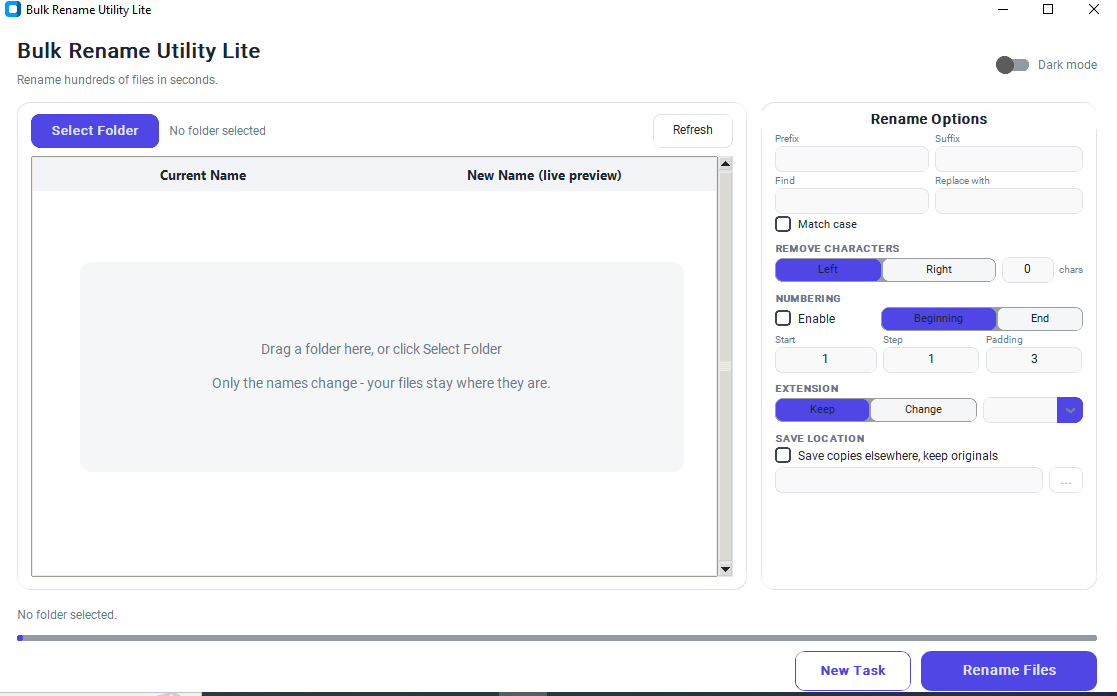
Bulk Rename Utility
Bulk Rename Utility

What it does

Standalone EXE

Run the application directly without installing Python.

No Installation

Simply download the EXE and start using it instantly.

Portable

No Windows Registry modifications or background services.

Bulk File Renaming

Rename hundreds or thousands of files in one operation.

Prefix & Suffix

Add custom text before or after filenames.

Find & Replace

Replace text in filenames with optional Match Case support.

Auto Numbering

Generate sequential filenames automatically.

Zero Padding

Create numbered files like 001, 002, 003, and more.

Extension Changer

Save renamed files with a different file extension.

Keep Originals

Save renamed copies while preserving the original files.

Live Preview

Preview all filename changes before applying them.

Fast Processing

Optimized for quick and reliable bulk renaming.

Simple Interface

Clean, beginner-friendly UI with no unnecessary complexity.

# Bulk Rename Utility

Bulk Rename Utility is a lightweight, portable Windows desktop application built with Python that makes renaming multiple files quick, easy, and efficient. Whether you're organizing photos, documents, music, videos, or project files, this tool helps you rename hundreds or even thousands of files in just a few clicks.

Designed with simplicity in mind, the application requires no installation—just download the executable and run it. It doesn't modify the Windows Registry, install background services, or require Python to be installed on your computer.

✨ Features

  • 🚀 Lightweight standalone Python EXE
  • 📥 No installation required — simply download and run
  • 🔒 No registry changes or hidden background processes
  • 📂 Rename multiple files in a single operation
  • 🔤 Add custom Prefix and Suffix
  • 🔍 Find & Replace text with Match Case support
  • 🔢 Automatic sequential numbering
  • 0️⃣ Custom Zero Padding (001, 002, 003...)
  • 📄 Change file extensions when needed
  • 💾 Save renamed files to a new location while keeping originals
  • 👀 Live preview before renaming
  • ⚡ Fast, simple, and beginner-friendly interface

💡 Perfect For

  • Photographers
  • Designers
  • Developers
  • Office users
  • Students
  • Anyone managing large collections of files

🖥️ System Requirements

  • Windows 10 / Windows 11 (64-bit)
  • No Python installation required

📦 Built With

  • Python
  • CustomTkinter
  • PyInstaller

📄 License

This project is released under the MIT License.

Installing it

  1. Download Exe
  2. Click it and open application for work

Version history

v1.0.0 Current
3 Aug 2026 · 17.1 MB

Questions about Bulk Rename Utility

What is Bulk Rename Utility?
A lightweight Windows application for renaming multiple files quickly and efficiently.
Does it require installation?
No. Just download the EXE file and run it.
Do I need Python installed?
No. The standalone EXE includes everything required.
Does it modify the Windows Registry?
No. The application does not create registry entries.
Can I rename hundreds of files at once?
Yes. It is designed for fast bulk file renaming.
Can I add prefixes and suffixes?
Yes. You can add custom text before or after filenames.
Does it support Find & Replace?
Yes. It includes text replacement with Match Case support.
Can I automatically number files?
Yes. Sequential numbering with customizable zero padding is supported.
Can I keep the original files?
Yes. You can save renamed copies while preserving the originals.
Which Windows versions are supported?
Windows 10 and Windows 11 (64-bit).

Similar tools

Other utilities people use alongside Bulk Rename Utility.