
Extract the pages you need from any PDF, entirely offline
Portable Open source
14 downloads
34.6 MB

Add text or image watermarks to any PDF — completely offline
Repairs the page content stream before stamping, so the watermark shows correctly even on scanner output and malformed PDFs where other tools render it invisible or mirrored.
Ten built-in presets or any custom text in nine real system fonts, or a PNG, JPG, BMP, WEBP, SVG or TIFF image with the alpha channel fully preserved.
Auto-sizes one watermark to span the entire page at any rotation angle using exact rotated bounding-box geometry, so it never overhangs the edge — even at 45°.
Single, Full Page Fit, Repeated Pattern, Grid, Diagonal Repeat and Across Whole Page, with horizontal and vertical gap controls and a 25–300% density slider.
The same 3×3 grid Acrobat uses, plus Diagonal Center, with ±400 pt X/Y offsets and an adjustable 0–200 pt edge margin. Pages with a /Rotate flag are handled correctly.
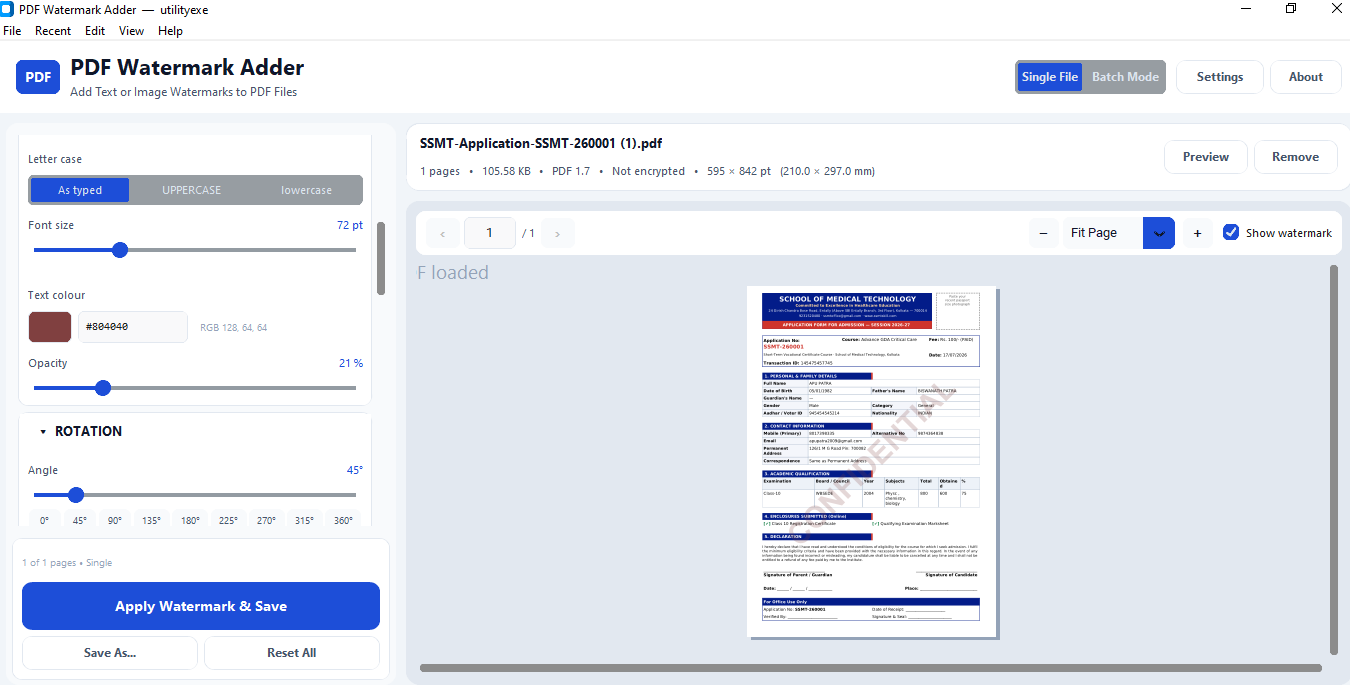
Renders the real page with the watermark applied at ten zoom levels, with Ctrl+wheel zoom, drag-to-pan and a toggle to compare before and after instantly.
A continuous slider with nine snap buttons. Image angles are baked in with bicubic resampling, since PDF only rotates images in multiples of 90°.
Opacity from 0% to 100% applied as real PDF transparency rather than a faded colour, so the watermark stays visible without obscuring the text underneath.
Normal, Multiply, Screen, Overlay, Darken and Lighten, injected as a PDF ExtGState. Viewers that ignore blending simply render Normal — the file is never broken.
Everything Acrobat accepts and a little more — 1-5,9,12 · 8- · -4 · last — plus skip-first, skip-last and skip-cover switches, with a live hint showing exactly what will be stamped.
Drop any number of PDFs to queue them, with per-file status, a live progress bar and clean cancellation checked between every page, not just every file.
Opens password-protected PDFs and re-saves with AES-256 using separate user and owner passwords, with granular print, copy, annotate and accessibility permissions.
Metadata, bookmarks, hyperlinks, form fields and annotations are preserved by default, and embedded images are copied byte-for-byte so the watermark is the only change.
Replacing the file you have open writes to a temporary file and atomically swaps it in, so a crash mid-save can never destroy your original. A low-disk-space check runs first.
A tiled bitmap is embedded once and referenced by every tile on every page — a 1,000-page tiled image watermark adds roughly 1 MB, not 1 GB.
Preview renders are debounced and threaded, and saves run on background workers, so a 1,000-page document stamps with a working progress bar and a responsive Cancel button.
Follows Windows automatically or lock it to your preference, with instant switching from the View menu.
Restores your entire watermark configuration on next launch — text, font, colour, opacity, rotation, position, layout and layer — plus the twelve most recent files.
No network calls exist anywhere in the code. No API, no cloud, no telemetry, no analytics, no update check, no account.
One self-contained file, no installer and no admin rights. Copy it to a USB stick and it runs on any Windows 10 or 11 machine without Python.
Most people who need to watermark a PDF end up on a website, uploading a contract or a set of invoices to a server they know nothing about. That is a strange thing to do with a confidential document — and it is the reason PDF Watermark Adder exists. It runs on your machine, reads and writes your files locally, and makes no network calls whatsoever. The only time an internet connection is involved is the first pip install if you build it from source.
You drop a PDF onto the window, choose a text or image watermark, and see the real page render with the watermark applied before you save anything. The preview is not an approximation — it renders the same content stream that gets written to disk, so what you see is what you get.
For text, there are ten one-click presets (CONFIDENTIAL, DRAFT, COPY, TOP SECRET, SAMPLE, PAID, ORIGINAL, APPROVED, DO NOT COPY, INTERNAL USE ONLY) or anything you type yourself. Nine font families load from real system TrueType files — Arial, Calibri, Verdana, Tahoma, Times New Roman, Courier New, Georgia, Trebuchet MS and Segoe UI — so the watermark looks identical to the same text set in Word. Size runs from 8 pt to 250 pt, colour comes from a picker with an editable HEX field and an RGB readout, and opacity from 0% to 100% is applied as true PDF transparency rather than a washed-out colour, which is why the text underneath stays readable.
For image watermarks it accepts PNG, JPG, JPEG, BMP, WEBP, SVG and TIFF. Transparent PNGs keep their alpha channel end to end. SVG files are rasterised at 4× so the edges stay crisp at any scale. Four page-scaling modes — Keep Aspect Ratio, Auto Fit, Original Size and Stretch — cover the usual cases, and image scale runs from 5% to 300% on top of whichever mode you picked.
Position uses the same 3×3 grid Acrobat does, plus a dedicated Diagonal Center button that applies the classic 45° angle automatically. On top of the preset you get horizontal and vertical offsets of ±400 pt and an edge margin from 0 to 200 pt. Pages carrying a /Rotate flag are handled properly: the watermark is laid out on the natural page box and then rotates with the page, exactly as Acrobat behaves.
Six layout modes: Single, Full Page Fit, Repeated Pattern, Grid, Diagonal Repeat and Across Whole Page. Full Page Fit is the one worth calling out — it auto-sizes a single watermark to span the whole page at whatever angle you chose, using exact rotated bounding-box geometry (w = L·|cos t| + H·|sin t|), so it never overhangs the edge even at awkward angles like 45° where naive implementations spill off the page. A coverage slider from 10% to 100% (default 92%) controls how much of the page it fills.
Rotation is a free 0–360° slider with nine snap buttons. For images the angle is baked into the bitmap with bicubic resampling, because PDF's native image rotation only understands multiples of 90°.
This is the difference between version 1.1 and 1.2, and it is the reason most watermarking tools fail on scanner output and files that have passed through several converters.
Those PDFs frequently ship a content stream with an unbalanced q operator. Whatever was left open stays in effect for anything appended afterwards. If an unclosed clipping path (W n) is still active, your watermark gets clipped away and becomes completely invisible. If an unclosed transform is still active, the watermark inherits it and comes out mirrored, shrunk, or shoved into a corner.
The Auto — Always Visible layer mode (now the default) wraps the original page content in its own q … Q pair before stamping, so the watermark starts from the identity matrix with no clip and a default graphics state. Measured on deliberately malformed test files:
| Test file | Fix off | Fix on |
|---|---|---|
| Unclosed clipping path | 0 watermark pixels — invisible | 339 px, correct position |
| Unclosed 0.25× transform | 25 px, squashed into a corner | 339 px, correct position |
| Well-formed PDF | 339 px | 339 px, unchanged |
It costs a few milliseconds per page, and there is no reason to turn it off.
Measured on a 1,000-page A4 document with a 335 KB source file:
| Operation | Time | Output size |
|---|---|---|
| Single text watermark | 1.3 s | 576 KB |
| Full-page tiled text | 26.9 s | 700 KB |
| Tiled image watermark | 8.8 s | 1.5 MB |
Those numbers come from specific engineering choices. A tiled image embeds the bitmap once and every tile on every page references that single object — which is why a 1,000-page tiled image watermark adds about 1 MB rather than 1 GB. Tiles that fall entirely outside the page are discarded before any drawing happens. Tiled text is emitted as one content stream per page instead of one per tile. Rendered fonts and prepared images are cached with a bounded cache so memory stays flat, and tiling is hard-capped at 400 × 400 as a safety net.
The interface never blocks. Preview renders are debounced at roughly 180 ms and run on a background thread that always draws the newest request and discards stale ones, so dragging an opacity slider does not flood the renderer. Saves and batch runs happen on worker threads that push results through a queue drained on the main thread. A 1,000-page document stamps in the background with a live progress bar and a Cancel button that actually works — cancellation is checked between every file and every page, so even a 2,000-page document stops within a fraction of a second.
Page selection covers All, First, Last, Odd, Even and custom expressions, and the expression parser accepts everything Acrobat does plus a little more: 1-5,9,12, 8- for page 8 onward, -4 for the first four, and last. Three exclusion switches — skip first page, skip last page, skip cover page — apply on top of whatever range you picked. A live hint under the field tells you exactly what will happen: 4 of 48 pages will be watermarked → 2-4, 9. Half-typed expressions show an inline amber warning and never blank the preview.
Batch mode starts automatically when you drop more than one PDF. Duplicates are removed, non-PDFs are filtered out, and each file shows live status through Pending → Processing → Completed / Failed / Skipped / Cancelled. When the run ends you get a summary with per-file reasons for anything that did not succeed.
Password-protected PDFs open with a modal prompt, and the saved file can be re-encrypted with AES-256 using separate user and owner passwords. In a batch, files needing a password you have not supplied are marked Skipped and the queue continues rather than halting.
Export settings preserve metadata, bookmarks, hyperlinks, form fields and annotations by default. With Keep original quality on, embedded images are copied through byte-for-byte — the watermark is genuinely the only thing that changes in the file. Overwriting the file you currently have open is handled safely: the new PDF is written to a temporary file and atomically swapped in, so a crash mid-save cannot destroy the original.
Being straight about the limits, because they matter more than the feature list when you are deciding whether this fits your workflow:
watermark.process_file() has no UI dependencies), but there is no CLI binary for scripting or scheduled tasks..ttf into assets\fonts\ to guarantee consistency.There are no network calls anywhere in the code. No API, no cloud, no telemetry, no analytics, no update check, no crash reporting. Settings and logs live in %APPDATA%\utilityexe\PDFWatermarkAdder\ and nowhere else. Delete that folder and the app is back to factory state. Your PDFs never leave the machine, which for anyone handling contracts, medical records, financial statements or client work is the entire point.
donot delet "_internal" folder when extract download file exe and "_internal" are plased same path other wise show error missing dll file
Other utilities people use alongside PDF Watermark Adder.
Extract the pages you need from any PDF, entirely offline
Edit PDF title, author, keywords and XMP — offline, in batch