Fast, Simple & Powerful Bulk File Renaming.
Portable Open source
7 downloads
17.1 MB

Turn Excel spreadsheets into barcode images in seconds
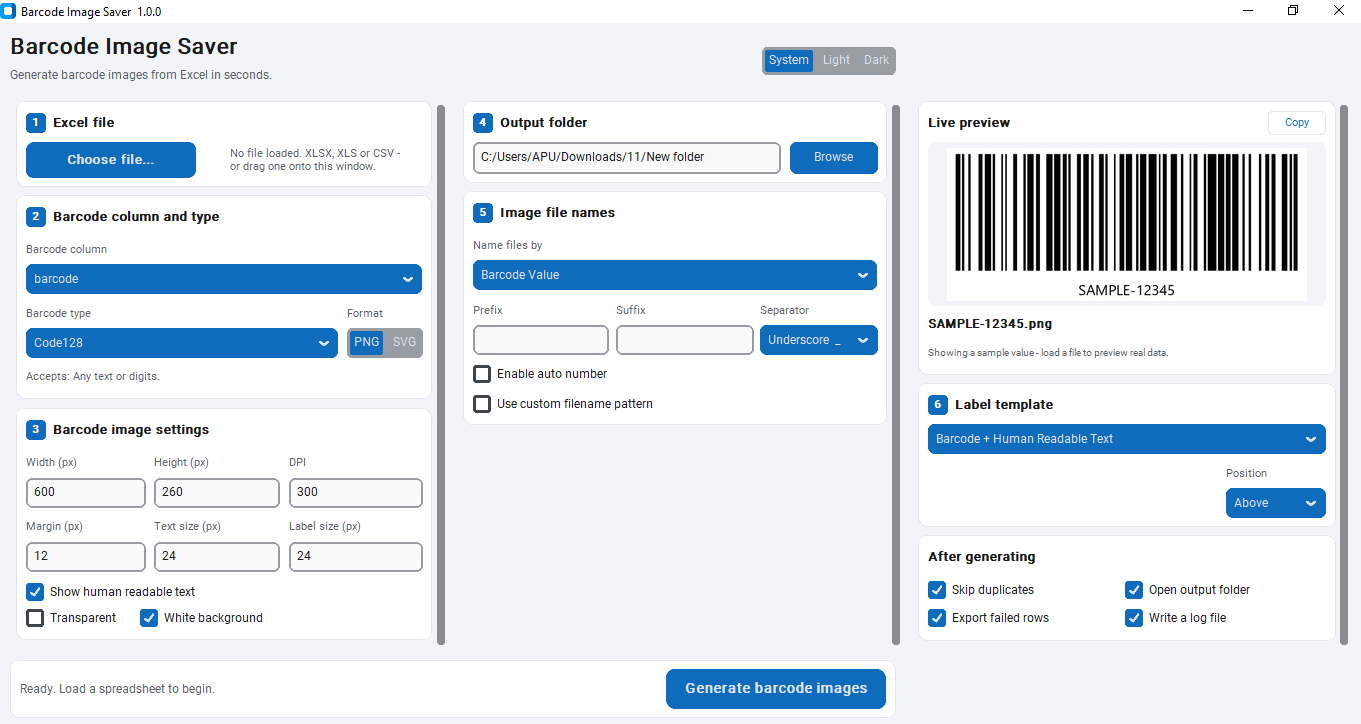
Supports .xlsx, .xlsm, .xls, and .csv with automatic delimiter and encoding detection — no manual export settings needed.
Barcode values are read as text, so codes like 0012345678905 keep their leading zeros instead of being corrupted into numbers.
Built for full product catalogs, not just small test batches — memory stays flat regardless of file size.
Automatically pre-selects the likely barcode column by matching header names like barcode, sku, upc, or ean.
Code128, Code39, EAN-13, EAN-8, UPC-A, ITF, ISBN, and GS1-128, each validated against its actual encoding standard.
EAN-13, EAN-8, UPC-A, and ISBN check digits are calculated or recalculated automatically to match the standard.
Generate raster images for everyday use or true vector files for print-quality scaling.
Set exact pixel dimensions, print-correct DPI, and quiet zone margin for every batch.
Bars and every text line occupy separate bands, capped and auto-shrunk to fit so labels never print with cut-off text.
Choose Barcode Only, Barcode + Text, Barcode + Product Name, or Barcode + Custom Column, with caption position above or below.
Build custom file name patterns from prefix, suffix, auto-number, row number, barcode value, and any column in your spreadsheet.
Matching file names are automatically suffixed (_1, _2, _3) instead of overwriting, even against files from a previous run.
Generates correctly named files in Bengali, Chinese, Russian, and other non-Latin scripts.
See the exact image and exact output file name before generating, updated live as you type.
Rows that fail are logged with the specific reason, such as an incorrect digit count, instead of failing silently.
Every skipped or invalid row is exported to its own Excel file with the reason, so nothing has to be tracked manually.
Benchmarked at 10,000 rows in 76 seconds with flat ~100 MB memory usage throughout the run.
Cancel a running batch in 6 milliseconds with no partial or orphaned files left behind.
Generation and file writing run off the main thread, so the window stays responsive during large batches.
All 34 settings, including the last used folders, are saved automatically between sessions.
Matches your Windows theme automatically or can be set manually.
Load a spreadsheet by dropping it on the window or opening it directly from File Explorer.
No account, no internet connection, and no upload of your product data to any server.
# Barcode Image Saver — Full Description
Barcode Image Saver turns a spreadsheet column into a folder full of barcode
images. Point it at an Excel or CSV file, choose the column that holds your
codes, pick a barcode type, and it writes one image per row — whether that's
10 rows for a test batch or 10,000 for a full product catalog.
Most barcode tools assume your data is perfect. In practice, spreadsheets
exported from inventory systems, POS software, or a supplier's price list
rarely are. Barcode Image Saver was built around that reality:
0012345678905 keeps its leading zeros instead of becoming 12345678905,
and long UPCs don't get mangled into scientific notation like 1.2E+11,
a common failure point in tools built on Excel libraries designed for
numeric data.
UTF-8 with BOM, UTF-16, UTF-32, Windows-1252, and Latin-1 are all handled,
along with comma, semicolon, tab, and pipe-delimited CSVs. A CSV exported
from an older POS system on a non-English Windows install often isn't
plain UTF-8, and silently misreading it produces barcodes for the wrong
values.
missing headers handled automatically — a messy export doesn't need
manual cleanup first.
.xlsx, .xlsm, .xls (via the optional xlrd package), and .csv, up to 1,000,000 rows.
names like barcode, code, sku, upc, ean, or product code.
Each symbology enforces the actual encoding rules for that standard, not
just bars that look plausible:
| Type | Accepts |
|---|---|
| Code128 (default) | Any text or digits |
| Code39 | Digits, A–Z, - . $ / + %, space |
| EAN-13 | 12 digits (13th calculated) |
| EAN-8 | 7 digits (8th calculated) |
| UPC-A | 11 digits (12th calculated) |
| ITF | Even number of digits |
| ISBN | 12 digits starting 978 or 979 |
| GS1-128 | Application identifiers, e.g. (01)09501101020917 |
EAN-13, EAN-8, UPC-A, and ISBN calculate the check digit for you. If a value
already includes a check digit, the app recalculates it rather than
trusting what's in the spreadsheet — a deliberate choice worth knowing
about before a large print run, since a typo in the last digit gets
silently corrected rather than flagged. Values the selected symbology can't
encode are logged with a specific reason, for example *"EAN must have 12
digits, received 9"*, rather than failing silently.
metadata for correct print sizing
image height, so proportions stay consistent from a 150px preview to a
2400px print file
its handling of background color differs from raster formats
is capped at 55% of the image height and shrunk to fit rather than
truncated, so a barcode number never gets cut off with an ellipsis
Label templates: Barcode Only, Barcode + Human Readable Text, Barcode +
Product Name, or Barcode + Custom Excel Column, with caption position set
to Above or Below the bars. If the chosen text column just repeats the
barcode value, the caption is skipped automatically rather than printing
the same number twice.
Four naming modes — Barcode Value, Row Number, Barcode Value + Row Number,
or a Custom Excel Column — combined with prefix/suffix, five separator
options, and auto-numbering (custom start value, step, and padding from
1 to 00001). For more control, a token-based custom pattern is
available:
```
{Prefix}{Sep}{Barcode}{Sep}{AutoNumber}{Sep}{Suffix}
```
Every column in your source file is available as its own token (e.g.
{product_name}). Safety handling includes:
\ / : * ? " < > |) replaced automatically বাংলা_001.png, 商品001.png, Продукт001.png
_1, _2, _3 appended rather than overwriting —checked against files already in the output folder from a previous run,
not just names generated in the current batch
The preview panel shows the exact image and exact file name you'll get,
updating as you type on a background thread so typing never stutters. If
the current data can't be encoded by the selected barcode type, it falls
back to a valid sample and explains why, instead of showing an empty box.
A Copy button puts the preview image directly on the clipboard.
On a 10,000-row workbook generating 500×200px images at 200 DPI:
| Metric | Result |
|---|---|
| Workbook load time | 0.6 seconds |
| Generation speed | ~132 images/second (76 seconds total) |
| Peak memory usage | ~100 MB, flat for the entire run |
| Cancel response time | 6 ms, with zero partial or orphaned files |
These figures come from an actual benchmark run. Memory stays flat because
images are written to disk as they're generated rather than held in
memory, which is what lets the same app handle 100 rows or 100,000 without
slowing down partway through. All rendering and file writing happens on
background threads, so the window never freezes — the progress bar shows
percentage, current file name, elapsed time, and estimated time remaining,
throttled to about 12 updates per second regardless of batch size.
After a run, you get counts of images generated, rows skipped for being
blank, rows skipped as duplicates, and rows that failed validation. A
failed row never consumes an auto-number, so the output sequence stays
gapless. Two optional files are written to the output folder:
| File | Contents |
|---|---|
failed_rows_<timestamp>.xlsx | Every rejected row with its specific reason |
barcode_image_saver.log | Run summary |
A three-column layout keeps every setting visible on one screen at
1366×768 with no scrolling, even with auto-numbering and a custom filename
pattern both open. Light, Dark, and System themes are supported, with a
Windows 11 visual style (rounded cards, blue accent, numbered steps).
Keyboard shortcuts cover the core workflow — Ctrl+O to open a
spreadsheet, Ctrl+G to generate, Esc to cancel a running batch, Ctrl+Q
to exit. Spreadsheets can be dropped directly onto the window, or opened
via right-click → Open With in File Explorer.
All 34 settings are saved automatically to
%APPDATA%\BarcodeImageSaver\settings.json using atomic writes, so a crash
can't corrupt the settings file. The last opened folder and output folder
are remembered, and Generate another batch resets options to default
while re-reading the spreadsheet from disk, so edits made since the last
run are picked up automatically. The app is high-DPI aware and stays sharp
on 4K displays.
In the interest of setting accurate expectations: this is a spreadsheet-to-
image tool, not a label design suite. It doesn't lay out multi-barcode
sheets for a specific label sheet product, and it doesn't print directly.
Drag-and-drop depends on the bundled tkinterdnd2 component — if a
particular build doesn't include it, the Choose File button covers the
same functionality. SVG preview is rasterized on screen because the
interface toolkit can't render vectors live, though the saved SVG file
itself is a true vector. Non-Latin label text needs a font that covers
that script; on Windows this is handled automatically via Segoe UI,
Nirmala UI (Bengali and other Indic scripts), and Microsoft YaHei
(Chinese). These are documented limitations, not surprises you'll
discover mid-project.
Anyone generating barcode images in bulk from existing data: small
retailers labeling inventory from a product spreadsheet, warehouses
printing pick labels, publishers generating ISBN barcodes for a catalog,
or anyone who has outgrown creating barcodes one at a time in an online
generator. It runs entirely offline on Windows 10 and 11, 32-bit or
64-bit — no account, no upload of your product data to a third-party
server, no per-image cost. No pandas or numpy dependency means the
installer stays small and nothing needs to compile on your machine.
Other utilities people use alongside Barcode Image Saver.
Fast, Simple & Powerful Bulk File Renaming.
Merge hundreds of Excel and CSV files into one clean workbook — offline and free
Bulk QR codes from Excel and CSV, without uploading your data anywhere